

TABLE OF CONTENTS
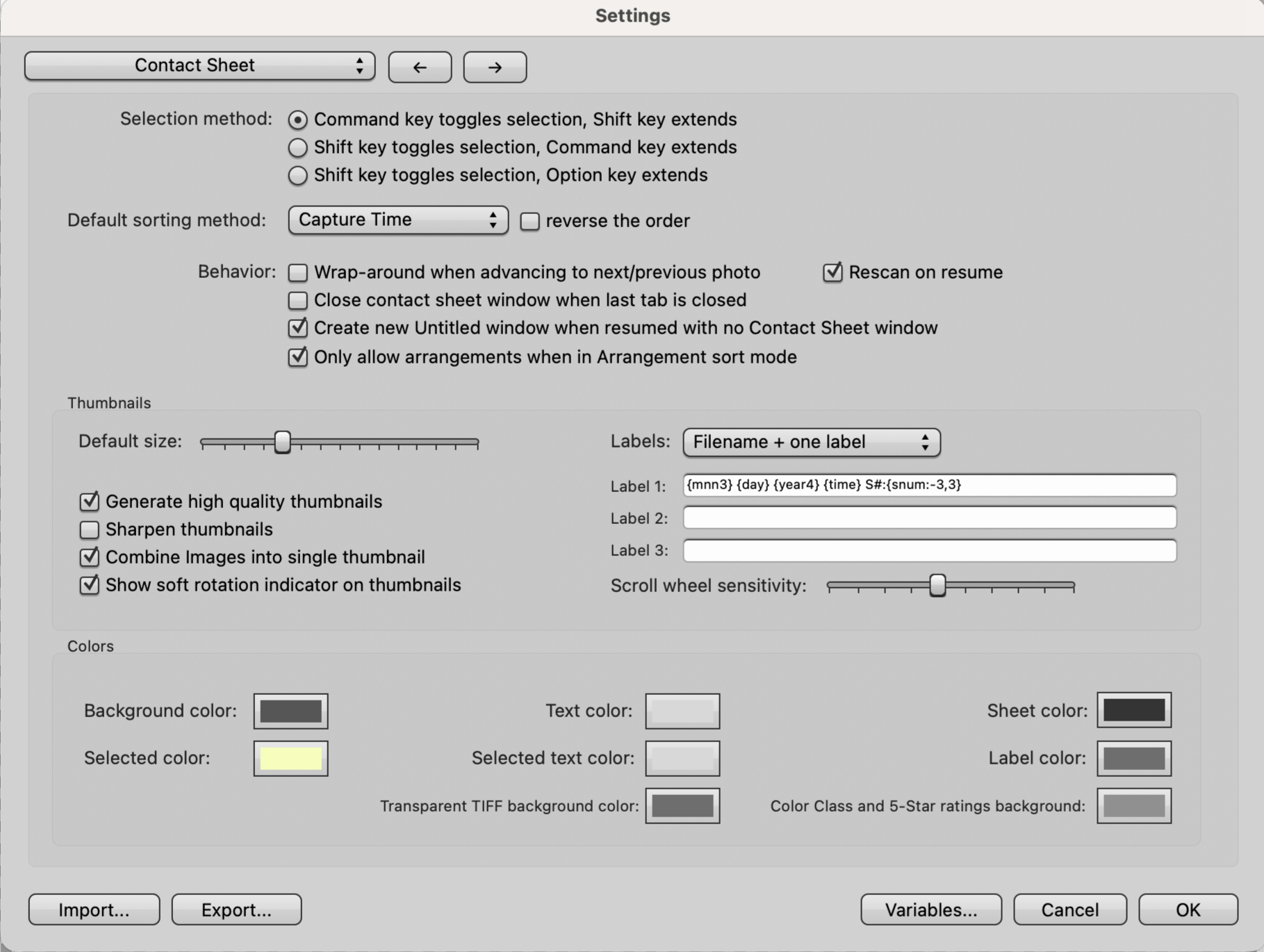
Selection Method
Three options on how a selection may be made. The default (first) option is the one most people will be familiar with.
Default Sorting Method
This is the default sorting order for new contact sheets. You can always change the sort order later.
Behavior
Wrap-around when advancing to next/previous photo: Toggles whether the arrow keys navigate from the last image in a contact sheet back to the first image.
Close contact sheet window when last tab is closed: When this is enabled, closing all the tabs in the contact sheet window will also close the window itself.
Create New Untitled window when resumed with no Contact Sheet window: If there are no contact sheets open and Photo Mechanic is minimized, a new blank contact sheet will be created when photo Mechanic is resumed.
Only allow arrangements when in Arrangement sort mode: Thumbnails can only be dragged to make new arrangements when the sorting method dropdown is set to Arrangement.
Rescan on resume: When enabled, Photo Mechanic scans files open in the contact sheet for external metadata changes such as modifications to the caption, keywords, Color Class, or filename.
If you notice a significant delay when switching back to Photo Mechanic from another program, clear the checkbox to turn off Rescan on resume. You can manually rescan a contact sheet using View>Rescan or by using the assigned keyboard shortcut (Default: Command-/ on macOS and / on Windows).
Thumbnails
Default Size: This is the default size of thumbnails in new contact sheets. It can be changed by using the thumbnail size slider on the toolbar.
Generate high quality thumbnails: When enabled, Photo Mechanic will cache a higher resolution thumbnail. Turning this off displays the small EXIF thumbnails only. Super-fast but low quality.
Sharpen thumbnails: Thumbnails will have sharpening applied and will look crisper to the eye but will take slightly longer to render.
Combine images into single thumbnail: Toggles the combination of image files such as RAW+JPEG pairs into a single thumbnail.
Show soft rotation indicator on thumbnails: Displays a symbol to show if a photo has been rotated.
Labels: Sets the number of lines that are used beneath each thumbnail. The default is Filename + one label. You can choose filename plus 1 to 3 more lines, each of which can display variables.
Scroll wheel sensitivity: (macOS only) Controls the amount that the mouse scroll wheel moves the screen while viewing the Contact Sheet.
Colors
You can change the colors used in parts of the Photo Mechanic interface. Swapping colors is particularly useful if the background or other interface colors conflict with colors in your photo shoot.
Select the box to the right of each item and use any of the color pickers to make your new selection. Select OK on the Contact Sheet Preferences window to apply changes.